
Guia completo da cabeça de cerdas Decapower
O Decapower® Bristle Head é um acessório que transforma uma furadeira ou parafusadeira de impacto em uma ferramenta de preparação de superfícies.
Resposta rápida
O Decapower® Bristle Head é um acessório que transforma uma furadeira ou parafusadeira de impacto em uma ferramenta de preparação de superfícies. Ele se encaixa em qualquer acionamento com conexão de engate rápido DIN 7428 E6.3 (1/4″), opera somente no sentido horário e tem velocidade de operação recomendada de 2.500–3.500 rpm — nunca acima de 3.500 rpm. Utiliza correias MBX® originais, montadas com as pontas voltadas no sentido de rotação. O resultado documentado é uma superfície totalmente limpa e rugosa, pronta para um novo revestimento — limpeza e criação de rugosidade, não um perfil de ancoragem especificado. Produz faíscas em metal.
A quem se destina este guia
Profissionais de reparo automotivo, técnicos de funilaria e equipes de manutenção que utilizam o Bristle Head em suas próprias furadeiras ou parafusadeiras de impacto, além de quem o especifica para uma oficina. Abrange a seleção do acionamento, a montagem da correia, a técnica, as orientações específicas para o Vinyl Zapper®, a segurança e a manutenção.
Conteúdo
- O que é e o que faz
- Especificações
- Escolha da unidade de acionamento
- Montagem e sentido de rotação
- Montagem do sistema adaptador e da correia
- Técnica de operação
- Controle de velocidade na prática
- Uso de discos Vinyl Zapper no Bristle Head
- Segurança
- Manutenção e resolução de problemas
- Perguntas frequentes
O que é e o que faz
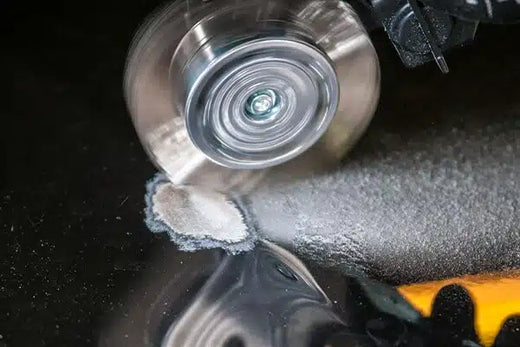
O Bristle Head é uma carcaça com empunhadura que porta uma correia MBX em um sistema adaptador, acionada por um eixo sextavado de 1/4″ por meio de uma furadeira ou parafusadeira de impacto já existente. Destina-se à preparação de superfícies de diversos substratos — em especial à remoção de subcapa (proteção contra pedras e vedação inferior da carroceria), PVC e outros compostos de vedação, e à remoção de tinta de carrocerias, sobretudo em cordões de solda resultantes de danos por colisão.
O manual descreve o resultado com cuidado: utilizado de acordo com as instruções, remove esses compostos sem gerar calor, não derrete os compostos e deixa uma superfície totalmente limpa e rugosa para a aplicação de um novo revestimento. Trata-se de uma afirmação delimitada às aplicações previstas e ao uso correto — não de uma alegação geral de ausência de calor, nem de uma especificação de perfil. O próprio manual instrui a reduzir a velocidade quando se observa aquecimento durante o uso do Vinyl Zapper.
Não apresente o resultado como um perfil de ancoragem definido. Descreva-o como limpeza e criação de rugosidade. Quando uma especificação de revestimento estabelece um perfil, trata-se de outro sistema e de outra discussão.
Especificações
| Especificação | Valor |
|---|---|
| Dispositivo de acionamento | Furadeira manual, com ou sem fio, ou parafusadeira de impacto |
| Velocidade de operação recomendada | 2.500–3.500 rpm |
| Velocidade em vazio | 0–3.500 rpm |
| Conexão da furadeira | DIN 7428 E6.3 (1/4″) |
| Peso | 0.560 kg |
| Nível de pressão sonora | 83 dB(A) |
| Nível de potência sonora | 88 dB(A) |
| Vibração | 1 m/s² |
Com pressão sonora de 83 dB(A), é obrigatório o uso de proteção auditiva. O manual o diz diretamente.
Escolha da unidade de acionamento
O manual recomenda parafusadeiras de impacto em vez de furadeiras comuns, pois a faixa de rpm disponível em uma parafusadeira de impacto é mais adequada ao Bristle Head. Furadeiras comuns funcionam, mas com eficiência ligeiramente menor.
A regra de seleção é simples: qualquer parafusadeira de impacto com velocidade de aproximadamente 3.000 rpm e conexão sextavada E6.3 de 1/4″ é adequada. O manual lista modelos específicos da Metabo, Milwaukee, Makita e Hikoki e declara expressamente que a lista não é exaustiva — portanto, uma parafusadeira que não conste da lista não fica, por isso, excluída.
O limite absoluto é o que importa:
Não utilize uma unidade de acionamento que exceda a velocidade máxima de 3500 rpm.
Este é um critério de seleção, não apenas uma instrução de operação. Verifique a velocidade máxima na etiqueta da unidade de acionamento antes de conectar qualquer coisa. Uma parafusadeira com velocidade nominal de 3.600 ou 3.700 rpm — e vários modelos comuns a têm — pode exceder o limite do Bristle Head mesmo quando o operador pretende trabalhar mais devagar. Se a única disponível for uma parafusadeira rápida, utilize uma com seletor de velocidade real, em vez de depender apenas do controle pelo gatilho.
Montagem e sentido de rotação
O Bristle Head se conecta a praticamente qualquer furadeira ou parafusadeira de impacto com engate rápido de 1/4″. Duas verificações no momento da conexão:
- O Bristle Head deve estar firmemente fixado no mandril de engate rápido.
- Deve girar alinhado com a furadeira. Uma cabeça desalinhada oscila, e a oscilação é tanto um problema de desempenho quanto de desgaste.
O sentido de rotação não é opcional:
O Bristle Head deve ser acionado somente no sentido horário, na direção da seta verde. Verifique a rotação da escova, que deve girar na direção da seta azul. A rotação no sentido oposto ao descrito acima pode causar danos graves à ferramenta e ferimentos ao operador.
As parafusadeiras de impacto invertem o sentido com facilidade e costumam ter um seletor de avanço/reversão logo abaixo do polegar. Confirme a posição do seletor antes de cada partida, e não apenas no início do turno.
Montagem do sistema adaptador e da correia
Desconecte a ferramenta da unidade de acionamento antes de realizar qualquer trabalho nela — antes de trocar a correia, durante as pausas e sempre que não estiver em uso.
- Afrouxe e remova o parafuso e a arruela dentada.
- Abra o sistema adaptador.
- Insira a correia MBX com as pontas voltadas no sentido de rotação.
- Coloque a parte externa do sistema adaptador e aperte o parafuso e a arruela.
- Verifique se o conjunto gira sem desvio e alinhado antes de reconectar o acionamento.
Utilize somente correias, peças e acessórios originais Decapower / MBX.
Técnica de operação
Três instruções do manual, que importam mais do que qualquer uma das especificações acima.
Sempre com as duas mãos. Segure firmemente a empunhadura e a unidade de acionamento com as duas mãos e adote uma postura estável. A máquina não deve ser utilizada sem a empunhadura.
Pressão leve. Pressione a máquina contra a superfície somente o necessário. Não aplique pressão excessiva que faça os arames se abrirem para os lados. O manual é explícito quanto à relação: menos pressão de contato = maior vida útil e maior desempenho, e a pressão excessiva danifica a correia MBX e pode romper a correia dentada de acionamento.
Movimente, não se detenha. Pressione levemente e desloque a máquina sobre a superfície em direção a si, com movimentos oscilantes. Em arestas, utilize a máquina somente no sentido longitudinal.
O padrão aqui é o mesmo que rege todos os sistemas de correia MontiPower®. Operadores que pressionam mais para trabalhar mais rápido obtêm menor rendimento e menor vida útil da correia, e então pressionam ainda mais.
Controle de velocidade na prática
O manual recomenda utilizar uma unidade de acionamento com velocidade de rotação ajustável e explica o motivo: assim é possível selecionar a velocidade ideal para cada aplicação. Conforme o dispositivo, a velocidade é ajustada por um gatilho sensível à pressão ou por um seletor de velocidade.
A instrução de proteção do equipamento é inequívoca:
Não exceda a velocidade de operação de 3500 rpm. Para evitar danos ao Decapower® Bristle Head, a velocidade máxima de rotação nunca deve exceder 3500 RPM. Uma velocidade de rotação mais alta pode danificar o próprio dispositivo e resultar em danos à escova.
Trabalhe entre 2.500–3.500 rpm no uso com correias. Abaixo dessa faixa, o manual não indica uma faixa de operação recomendada — e não afirma que velocidades mais baixas não produzam efeito algum, portanto não repita isso como regra.
Uso de discos Vinyl Zapper no Bristle Head
O Bristle Head também aceita discos Vinyl Zapper, que são montados no mesmo sistema adaptador que as correias MBX. As orientações de velocidade são diferentes, e os valores do Bristle Head para correias não se aplicam.
A velocidade de rotação ao utilizar o disco Vinyl Zapper® deve ser inferior à das escovas MBX. Para um desempenho ideal, recomenda-se uma velocidade de rotação de aproximadamente 1150 Rpm. Quando se observar aquecimento da superfície, as Rpm devem ser reduzidas.
Ou seja: aproximadamente 1.150 rpm, com redução adicional se surgir calor. Isso é menos da metade da velocidade recomendada para correias, e operar um disco Vinyl Zapper na velocidade das correias do Bristle Head é um caminho para danificar a superfície.
Montagem do disco: os discos têm ranhuras que se posicionam sobre o adaptador de alumínio para fixá-los e mantê-los no lugar durante a operação. Posicione o disco corretamente no sistema adaptador e fixe-o apertando o parafuso central.
O disco destina-se à remoção de vinil, resíduos de adesivo, películas refletivas, etiquetas, decalques e fitas dupla-face de superfícies revestidas e não revestidas. O manual declara que o disco foi projetado para não danificar superfícies pintadas e traz uma ressalva explícita: é preciso ter cuidado com plásticos pintados e reparos de pintura não originais (não OEM). Trate isso como um limite de escopo, não como uma nota de rodapé. Faça um teste em uma área pouco visível antes de trabalhar em um painel aparente.
Segurança
EPI. Óculos de segurança, luvas de proteção e calçado resistente. O material removido durante o trabalho pode ser prejudicial à saúde — use máscara contra poeira. Use proteção auricular.
Faíscas. O manual o afirma diretamente: ao trabalhar em metal, as faíscas produzidas podem inflamar materiais ou gases combustíveis presentes na área de trabalho. Assegure que todas as pessoas na área de trabalho usem EPI adequado e mantenha os materiais combustíveis fora da zona de projeção de faíscas.
Isolamento. Desconecte a ferramenta da unidade de acionamento antes de qualquer trabalho na própria ferramenta e quando não estiver em uso.
Integridade da carcaça. Não perfure a carcaça nem fixe rebites para identificar a máquina — isso compromete o isolamento. Use etiquetas adesivas.
Gatilho para interromper o uso. Se surgirem subitamente vibrações ou ruídos anormais, pare a máquina imediatamente e verifique se a correia apresenta danos ou desgaste.
A proteção respiratória deve ser selecionada em função do revestimento, do substrato, da contaminação presente e da avaliação de riscos local. Revestimentos antigos de veículos, em particular, podem conter substâncias que alteram a proteção necessária.
Manutenção e resolução de problemas
O manual é breve neste ponto porque há realmente pouco a fazer: a máquina requer muito pouca manutenção. Limpe-a após o uso e remova toda a contaminação. Em correspondências e pedidos de peças de reposição, informe sempre o número de série indicado na placa de identificação da máquina.
| Sintoma | Verificação |
|---|---|
| Oscilação ou vibração | O Bristle Head está firmemente fixado e girando alinhado com o acionamento? A correia está corretamente assentada e o parafuso central apertado contra a arruela dentada? |
| Vibração ou ruído anormal repentino | Pare imediatamente. Inspecione a correia quanto a danos ou desgaste antes de reiniciar |
| Queda de rendimento | Verifique primeiro a pressão de contato — arames abertos indicam pressão excessiva. Em seguida, verifique o estado da correia e a velocidade do acionamento |
| Desgaste rápido da correia | Pressão de contato excessiva ou velocidade acima da faixa recomendada |
| Marcas de calor durante o uso do Vinyl Zapper | Reduza as rpm; verifique se a ferramenta está sendo mantida em movimento |
| Superaquecimento da unidade de acionamento | Problema da unidade de acionamento — consulte as instruções do respectivo fabricante |
Proteção ambiental. Recicle as matérias-primas em vez de descartá-las como resíduo. A máquina, os acessórios e a embalagem devem ser separados para uma reciclagem ambientalmente correta, e os componentes plásticos estão identificados para reciclagem por categoria.
Aplica-se uma garantia de acordo com as condições de venda e entrega da MontiPower. Danos causados por desgaste normal, sobrecarga ou manuseio inadequado estão excluídos — o que é mais um motivo para respeitar o limite de velocidade e a disciplina de pressão.
Perguntas frequentes
Minha parafusadeira de impacto serve?
Se tiver engate rápido sextavado E6.3 de 1/4″ e velocidade máxima igual ou inferior a 3.500 rpm, sim. Verifique a velocidade máxima na etiqueta — vários modelos populares de 18 V e 40 V têm velocidade nominal de 3.600 rpm ou mais e excedem o limite.
Furadeira ou parafusadeira de impacto?
Recomendam-se parafusadeiras de impacto, pois sua faixa de rpm é mais adequada à ferramenta. Furadeiras comuns funcionam, com eficiência ligeiramente menor.
É possível operá-lo no sentido anti-horário em locais de difícil acesso?
Não. Somente no sentido horário. A rotação inversa pode causar danos graves à ferramenta e ferimentos ao operador.
Ele gera um perfil de ancoragem?
Ele limpa e cria rugosidade. Não trate isso como um perfil de ancoragem especificado e, quando uma especificação de revestimento estabelecer um perfil, confirme o requisito com o inspetor responsável e utilize o sistema adequado.
Posso usar qualquer correia de arame?
Utilize somente correias, peças e acessórios originais Decapower / MBX.
Por que a correia se abre para os lados?
Pressão de contato excessiva. É o sinal documentado de pressão em excesso: reduz a vida útil da correia e diminui o rendimento, em vez de aumentá-lo.
Próximos passos
Consulte a página Decapower para as configurações atuais, a linha de correias MBX para os consumíveis e a página Vinyl Zapper para as opções de discos. As instruções de operação completas, incluindo a tabela de unidades de acionamento recomendadas e as figuras mencionadas acima, estão na seção de manuais.
Solicite um orçamento ou fale com um especialista MontiPower.
Relevant reads
Guia de decisão para solução de problemas MontiPower
Resposta rápida Siga sempre os mesmos três passos. Primeiro, verifique se o sintoma é uma condição de interrupção...
Ler →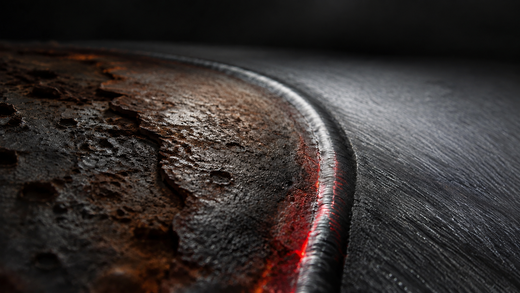
Cronograma de manutenção preventiva para ferramentas MontiPower
Resposta rápida Não existe um cronograma único de manutenção preventiva para as ferramentas MontiPower®, e qualquer tabela que...
Ler →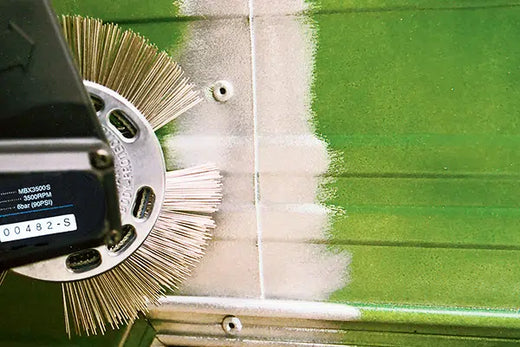
MBX vs. Bristle Blaster: como escolher o sistema correto
Resposta rápida Escolha de acordo com o resultado que o trabalho exige. O Bristle Blaster® é o sistema...
Ler →Fale-nos da sua superfície.
Recomendaremos o método.
Obtenha uma recomendação específica para o seu substrato, revestimento e norma, e não uma folheto genérica.